Année scolaire 2025-2026
Qu est ce ?
$\LaTeX$ est un langage et un système de composition de documents créé par Leslie Lamport
écrit par : Stéphane Le Méteil, le 30/07/2017
Tableau de signes
Avec le package \usepackage{tikz,tkz-tab}
Pour gérer la largeur de la première colonne on peut jouer avec lgt
La documentation complète est là
Pour gérer la largeur de la première colonne on peut jouer avec lgt
\begin{tikzpicture}
   \tkzTabInit[lgt=3]{$x$ / 1 , $x^2-3x+2$ / 1}{$-\infty$, $1$, $2$, $+\infty$}
   \tkzTabLine{,+, z, -,z,+, }
\end{tikzpicture}
écrit par : Stéphane Le Méteil, le 01/08/2017
Arbre de probabilités
Je me suis battu en vain avec pstplus et finalement la documentation de pstree est largement suffisante.
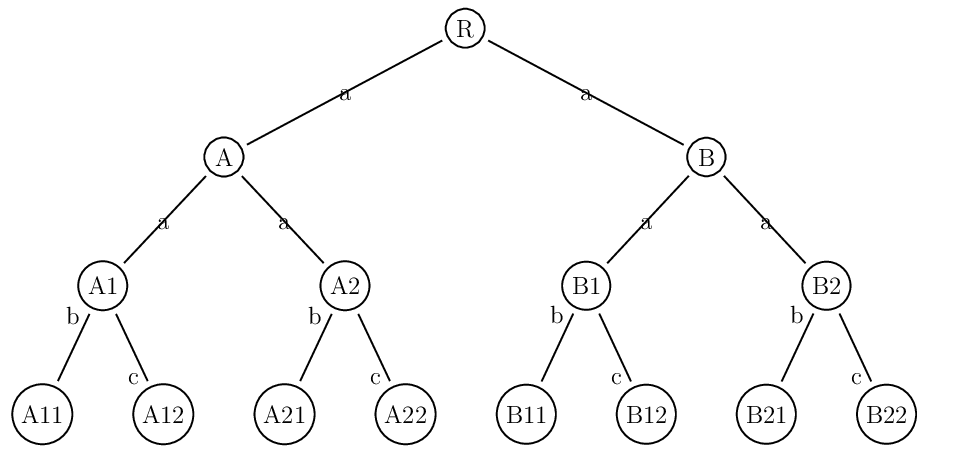
\psset{treemode=R,nodesep=1mm,levelsep=20mm,treesep=5mm}
%\pstree[treemode=R,levelsep=15ex]{\Tcircle{R} }{
\pstree{\TR{$\Omega$} }{
\pstree{ \Tcircle{$A1$}\taput{$\frac18$} }
    {
    \pstree{ \Tcircle{$A2$}\taput{$\frac18$} }
        {
        \Tcircle{$A3$}\taput{$\frac18$}
        \Tcircle{$\overline{A3}$}\tbput{$\frac78$}
        }
    \pstree{ \Tcircle{$\overline{A2}$}\taput{$\frac78$} }
        {
        \Tcircle{$A3$}\taput{$\frac18$}
        \Tcircle{$\overline{A3}$}\tbput{$\frac78$}
        }
    }
\pstree{ \Tcircle{$\overline{A1}$}\taput{$\frac78$} }
    {
    \pstree{ \Tcircle{$A2$}\taput{$\frac18$} }
        {
        \Tcircle{$A3$}\taput{$\frac18$}
        \Tcircle{$\overline{A3}$}\tbput{$\frac78$}
        }
    \pstree{ \Tcircle{$\overline{A2}$}\taput{$\frac78$} }
        {
        \Tcircle{$A3$}\taput{$\frac18$}
        \Tcircle{$\overline{A3}$}\tbput{$\frac78$}
        }
    }
}
écrit par : Stéphane Le Méteil, le 17/08/2017
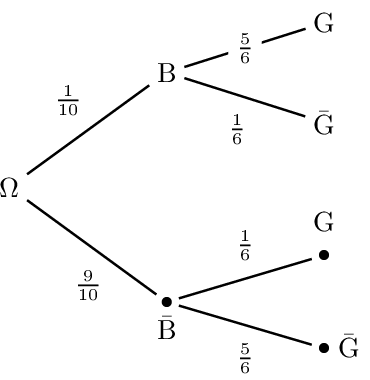
Arbre de probabilités (bis)
\documentclass [a4paper,10pt] {article}
\usepackage [latin1]{inputenc}
\usepackage [T1]{fontenc}
\usepackage [francais]{babel}

\usepackage{amsmath,amsfonts,amssymb}
\usepackage{mathrsfs,eurosym}
\usepackage{pstricks,pst-plot,pst-eucl}
\usepackage{pst-tree}

\begin{document}

Un peu de baratin avant \bigskip

\begin{minipage}{0.4\linewidth}%une minipage pour le premier arbre
% Créé avec PST+ et modifié à la main
\psset{nodesep=1mm,levelsep=20mm,treesep=10mm}
\pstree[treemode=R]{\Tr{$\Omega$}}
{\pstree[ref=c]
   {\Tr{${\rm B}$}\naput{\small $\frac{1}{10}$}}
   {\Tr{${\rm G}$}\ncput*{\small $\frac{5}{6}$}
    \Tr{$\bar{\rm G}$}\nbput{\small $\frac{1}{6}$}}
 \pstree[ref=c]
   {\Tdot~[tnpos=b]{$\bar{\rm B}$}\tbput{\small $\frac{9}{10}$}}
   {\Tdot~[tnpos=a]{${\rm G}$}\taput{\small $\frac{1}{6}$}
    \Tdot~[tnpos=r]{$\bar{\rm G}$}\tbput{\small $\frac{5}{6}$}}
}
\end{minipage}\hfill

\bigskip Un peu de baratin après
\end{document}
écrit par : Stéphane Le Méteil, le 18/08/2017
Un essai
Bonjour, j'écris en $ Latex $ ou en $\frac12$
écrit par : Stéphane Le Méteil, le 02/09/2017
Boites
fancybox
Package tcolorbox
Des boites de toutes les couleurs extrêmement paramétrables.
\fcolorbox {couleur de la police}{couleur du fond}{contenu)
\ovalbox{contenu}
Des boites de toutes les couleurs extrêmement paramétrables.
écrit par : Stéphane Le Méteil, le 28/09/2017
Tableaux et tabulation automat
Créer un tableau avec des colonnes de taille fixe et centrées
\def\taille{\vrule height 20pt depth 20pt width 0pt }
    \begin{tabular}{*{4}{|>{\centering}p{3cm}}|}
    \hline
    \taille $a$ & $b$ & $c$ & $d$\cr
    \hline
    \end{tabular}
Le package spreadtab permet d'utiliser un tableur basique, il est pratique pour tabuler automatiquement des fonctions, des suites, etc.
\begin{spreadtab}{{tabular}{|c|*{13}{c|}}}
 \hline
 @$x$ & 0 & \STcopy{>}{b1+0.5} & & & & & & & & &&&\\\hline
 @$f(x)$ & \STcopy{>}{-0.08*b1*b1+0.8*b1+1.92} & & & & & & & & &&&&\\\hline
\end{spreadtab}
écrit par : Stéphane Le Méteil, le 03/10/2017
Variations
Les beaux tableaux sont décrits ici :
http://distrib-coffee.ipsl.jussieu.fr/pub/mirrors/ctan/macros/latex/contrib/tkz/tkz-tab/doc/tkz-tab-screen.pdf
Pour placer une valeur intermédiaire, on peut utiliser tkzTabIma
tkzTabIma {position de départ de la flèche}{position de fin de la flèche}{position de la valeur d’entête}{valeur à afficher sur la ligne}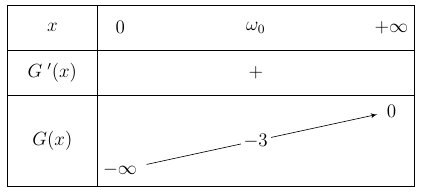
\usepackage{tikz,tkz-tab}

\begin{tikzpicture}
\tkzTabInit{$x$/1,$1-x$/1,$f'(x)$/1,$f(x)$/2}{$0$,$1$,$+\infty$}
\tkzTabLine{ ,+,z,-}
\tkzTabLine{ ,+,z,-}
\tkzTabVar{-/$0$,+/$f(1)$,-/$0$}
\end{tikzpicture}
tkzTabIma {position de départ de la flèche}{position de fin de la flèche}{position de la valeur d’entête}{valeur à afficher sur la ligne}
\begin{tikzpicture}
\tkzTabInit{$x$/1,$G\:'(x)$/1,$G(x)$/2}
  {$0$,$\omega_0$,$+\infty$}
\tkzTabLine{ ,,+}
\tkzTabVar{-/$-\infty$,R/,+/$0$}
\tkzTabIma{1}{3}{2}{$-3$}
\end{tikzpicture}
écrit par : Stéphane Le Méteil, le 10/10/2017
Enumerate
Ceci permet de réduire l'intentation de second niveau
\usepackage{enumerate}

\begin{enumerate}
\item machin
    \begin{enumerate}[\hspace{-30pt}a)]
    \item  truc
    \end{enumerate}
\end{enumerate}
écrit par : Stéphane Le Méteil, le 14/01/2018
Boucle
Avec le package Tikz, on dispose de la possibilité de boucle.
Il suffit de déclarer le compteur dans le préambule avec un
Il suffit de déclarer le compteur dans le préambule avec un
\newcounter{mt}
puis on l'utilise, ici dans une fonction :
\def\anti#1{\loop\stepcounter{mt}\!\ifnum\value{mt}<#1\repeat}
Cette boucle permet de règler les espaces négatifs dans une intégrale, lorsque la fonction est trop loin du signe somme à mon gout.
écrit par : Stéphane Le Méteil, le 09/02/2018
Réduire l'indentat
\usepackage{enumerate}

\begin{enumerate}
\item machin
    \begin{enumerate}[\hspace{-30pt}a)]
    \item  truc
    \end{enumerate}
\end{enumerate}
ou avec
\usepackage{paralist}

\setdefaultleftmargin{0.6cm}{0.5cm}{}{}{}{}
écrit par : Stéphane Le Méteil, le 09/02/2018
Lignes et boites
- une ligne pour séparer des parties : RULE
\hfil\rule{8cm}{0.2mm} - aligner des minipages en haut: [t]
\begin{minipage}[t]{0.55\linewidth}
écrit par : Stéphane Le Méteil, le 09/02/2018
Simuler un tableur
\usepackage{pas-tableur}\usetikzlibrary{math}
Puis :
\begin{tikzpicture}[thick,scale=0.6, every node/.style={scale=0.6}]
\tableur[12]{A-B}
\celtxt[c]{A}{1}{Valeurs}
    \foreach \x in {2,...,10}
    {
    \pgfmathtruncatemacro\z{7*\x+1-\x*\x/5};
    \celtxt[c]{A}{\x}{\z}
    }
\selecCell {A}{11}
\end{tikzpicture}
ou bien
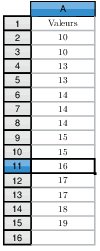
\begin{tikzpicture}[thick,scale=0.6, every node/.style={scale=0.6}]
\tikzmath{
\x1 = 10;
\x2 = 10;
\x3 = 13;
\x4 = 13;
\x5 = 14;
\x6 = 14;
\x7 = 14;
\x8 = 15;
\x9 = 15;
\x{10} = 16;
\x{11} = 17;
\x{12} = 17;
\x{13} = 18;
\x{14} = 19;
}
\tableur[16]{A}
\celtxt[c]{A}{1}{Valeurs}
    \foreach \ind in {1,...,14}
    {\pgfmathtruncatemacro\colonne{\ind+1}
    \celtxt[c]{A}{\colonne}{\x{\ind}}
    }
\selecCell {A}{11}
\end{tikzpicture}
écrit par : Stéphane Le Méteil, le 09/02/2018
Trait de marge à gauche
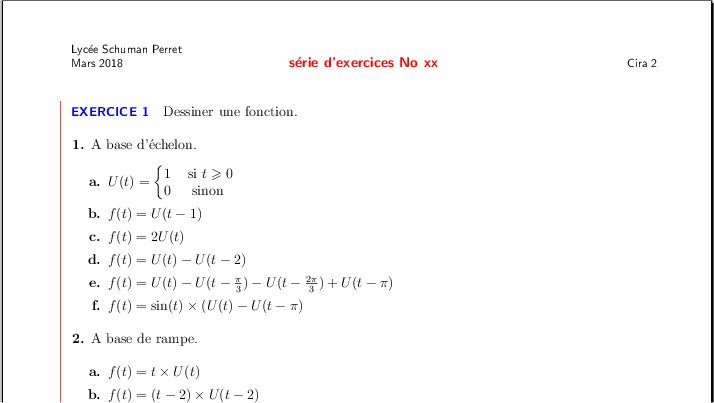 Dans le préambule il suffit d'écrire :
>
\usepackage[a4paper]{geometry}
\usepackage{graphicx}
\usepackage{eso-pic}

\newlength{\positionbarre}
\setlength{\positionbarre}{2.5cm}% à changer selon les besoin
\AddToShipoutPicture{%                      \/
\put(\LenToUnit{\positionbarre},\LenToUnit{0.05\paperheight})
{\begin{picture}(0,0)(0,0) \line(0,1)
{\LenToUnit{0.85\paperheight}}\end{picture}}
}%            /\
\makeatother
écrit par : Stéphane Le Méteil, le 09/10/2018
Systèmes
Un package intéressant pour manipuler les système habilement.
écrit par : Stéphane Le Méteil, le 29/10/2018
QCM automatiques
La package alterqcm permet de créer des QCM avec des propositions réparties aléatoirement, pratique pour éviter la copie. Par ailleurs il permet de générer le corrigé sans plus d'efforts :)
Documentation
écrit par : Stéphane Le Méteil, le 06/11/2018
Système
On peut facilement écrire un système avec :
$\begin{cases}
3x+2y=5\\
5x-9y = 11\\
\end{cases}$
écrit par : Stéphane Le Méteil, le 27/10/2020
boites
De bonnes idées http://math.univ-lyon1.fr/irem/IMG/pdf/LatexPourLeProfDeMaths.pdf page 34 et plus
écrit par : Stéphane Le Méteil, le 27/10/2020
Des labels avec les axes
\psaxes[
labelFontSize=\scriptstyle,
xAxis=true,
yAxis=true,
Dx=1,Dy=1,
ticksize=-2pt 0,
subticks=2]{->}(0,0)(-3,-0.6)(8,5)[$x$,-120][$y$,-150]
écrit par : Stéphane Le Méteil, le 27/10/2020
Limites à droite ou à gauche
$\displaystyle\lim_{{x \to - 3}\atop{x > -3}} f(x)$
donne : $ \displaystyle\lim_{{x \to - 3}\atop{x > -3}} f(x) $
écrit par : Stéphane Le Méteil, le 27/10/2020
Polynôme
Le package polynom permet d'effectuer quelques opérations sur les polynômes et de présenter les divisions euclidiennes, c'est assez pratique.
écrit par : Stéphane Le Méteil, le 27/10/2020
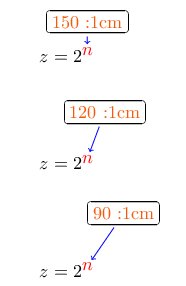
Bulle de commentaire
\usepackage{tikz}

\definecolor{monOrange}{rgb}{0.97,0.35,0.04}
\newcommand*\commentterm[4][]{%
   \begin{tikzpicture}[anchor=base west,%
                       baseline,%
                       inner sep=0pt,%
                       outer sep=0pt,%
                       minimum size=0pt]%
      \node(xa){$#3$};
      \node[overlay,at=(xa),shift=(#2)](xb){#4};
      \draw[overlay,->,shorten <=2pt,shorten >=2pt,#1](xb)to(xa);
   \end{tikzpicture}%
}

$z=2^{\commentterm[color=blue]{\n:2cm}{\color{red}n}{\color{monOrange} \n:2cm}}$
|
|
écrit par : Stéphane Le Méteil, le 27/10/2020
Echelle trigo
Voilà un exemple tout prêt :
\psset{xunit=1cm,yunit=1cm,algebraic=true,dimen=middle,
      dotstyle=o,dotsize=5pt 0,linewidth=0.2pt,arrowsize=3pt 2,
      arrowinset=0.25,trigLabels=true}
\begin{pspicture*}(-0.8,-0.5)(3.2,1.8)
\begin{scriptsize}
\multips(0,-0.5)(0,0.5){5}
{\psline[linestyle=dashed,linecap=1,dash=1.5pt 1.5pt,
         linewidth=0.4pt,linecolor=lightgray]{c-c}(-0.5,0)(3.5,0)}
\multips(-0.5,0)(0.5,0){9}
{\psline[linestyle=dashed,linecap=1,dash=1.5pt 1.5pt,
         linewidth=0.4pt,linecolor=lightgray]{c-c}(0,-0.5)(0,1.5)}
\psaxes[showorigin=false,xAxis=true,yAxis=true,Dx=1,Dy=1,dy=5,
        ticksize=-2pt 0,subticks=2]
        {->}(0,0)(-0.8,-0.4)(3.2,1.5)[$t$,120][$y$,-150]
\psline[linewidth=1pt,linecolor=blue](-1,1)(0,0)(1,1)(2,0)(3,1)(4,0)
\rput[bl](-0.2,1){$\pi$}
\rput[bl](-0.25,-0.25){O}
\end{scriptsize}
\end{pspicture*}
écrit par : Stéphane Le Méteil, le 27/10/2020
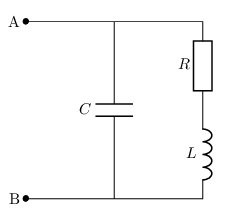
circuitikz erreur
Pour corriger l'erreur + ou- missing lors de la compilation, il faut ajouter
\usetikzlibrary{babel}
\documentclass[a4paper,10pt]{article}
\usepackage[utf8]{inputenc}
\usepackage[frenchb]{babel}
\usepackage{amsmath,amssymb}
\usepackage{pgf,tikz}\usetikzlibrary{babel}
\usepackage[europeanresistors,americaninductors]{circuitikz}
\begin{document}

\scalebox{0.75}{
\begin{circuitikz}[american voltages]
\draw
   % rotor circuit
  (0,4) to [short, *-] (4,4)
  to [R, l_=$R$] (4,2)
  to [L, l_=$L$] (4,0)
  to [short,-*] (0,0)

  (2,0) to [C, l=$C$] (2,4);

 \draw (0,0) node {$\bullet$} node [left] {B};
 \draw (0,4) node {$\bullet$} node [left] {A};
\end{circuitikz}
}
\end{document}
|
|
écrit par : Stéphane Le Méteil, le 27/10/2020
largeur de tableau
\begin{tabular*}{}{@{\extracolsep\fill}}
exemple :
\begin{tabular*}{0.95\textwidth}{@{\extracolsep{\fill}}*{4}{l}}

\end{tabular*}
écrit par : Stéphane Le Méteil, le 27/10/2020
Grille
Un code compact regroupant quelques astuces : afficher l'origine, labels des axes et grille 5x5 automatique.
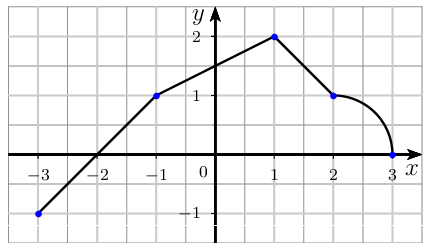
\psset{xunit=1cm,yunit=1cm,
       algebraic=true,dimen=middle,
       dotsize=3pt 0,linewidth=1pt,
       arrowsize=3pt 2,arrowinset=0.25}
\begin{pspicture*}(-3.5,-1.5)(3.5,2.5)
\psgrid[gridcolor=lightgray,subgriddiv=2,gridlabels=0]
\psaxes[showorigin=false,labelFontSize=\scriptstyle,
        xAxis=true,yAxis=true,Dx=1,Dy=1,
        ticksize=-2pt 0,subticks=2]
        {->}(0,0)(-3.5,-1.5)(3.5,2.5)[$x$,-120][$y$,-150]
\rput(-0.2,-0.3){\scriptsize 0}
\psline(-3,-1)(-1,1)(1,2)(2,1)
\parametricplot{0}{1.5707963267948966}{cos(t)+2|sin(t)}
\psdots[dotstyle=*,linecolor=blue](-3,-1)(-1,1)(1,2)(2,1)(3,0)
\psplot[linecolor=red,linewidth=1.5pt]{-3}{3}{0.5*x^2+0.5x+5}
\end{pspicture*}
écrit par : Stéphane Le Méteil, le 28/03/2021
Symboles
Les $\bullet$, $\square$ et autres symboles ont listés ici
Site officiel
écrit par : Stéphane Le Méteil, le 19/01/2022
BOITES (plus)
Des boites propres sont facilement accessibles avec le package tcolorbox
Il suffit de taper :
\begin{tcolorbox}
	$f(x) = \dfrac{e^x}{x}\times\dfrac{e^x}{\frac1x-1}$
\end{tcolorbox}
|
pour créer : 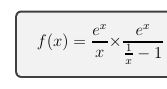
|
écrit par : Stéphane Le Méteil, le 19/01/2022
Fonction pstricks
\begin{pspicture}(-3,-1)(3,6)
\psset{xunit=1 cm,algebraic=true}
\def\f{x*x+1}
\def\g{1/(\f)}
\psaxes{->}(0,0)(-3,-1)(3,6)
\psplot[linecolor=red,linewidth=1.5pt]{-2.5}{2.5}{\f}
\psplot[linecolor=blue,linewidth=1.5pt]{-2.5}{2.5}{\g}
\end{pspicture}
écrit par : Stéphane Le Méteil, le 11/07/2022
Un 'L' rond
Il suffit de taper
\ellpour avoir $ \ell $
écrit par : Stéphane Le Méteil, le 16/10/2024
tableau cases centrées
\begin{tabular}{|*{5}{>{\centering\arraybackslash}p{1cm}|} }
  \hline
  \tvi a & b & c & d & $-2$ \\ \hline
\end{tabular}
écrit par : Stéphane Le Méteil, le 02/11/2025
division de polynômes
\usepackage{polynom}

\polylongdiv[style=D]{x^3+x^2-5x+3}{x-1}
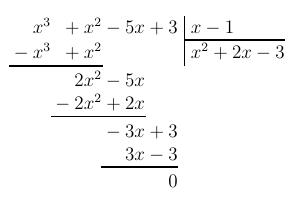
écrit par : Stéphane Le Méteil, le 17/11/2025
ps2pdf
Lorsque ps2pdf ne fonctionne plus, une idée qui a fonctionné
installer gsview et ghostscript
leur permettre de gérer les gs et pdf
et c'est reparti
installer gsview et ghostscript
leur permettre de gérer les gs et pdf
et c'est reparti
écrit par : Stéphane Le Méteil, le 23/11/2025
Colonnes de tableau
Deux types de colonnes forts pratiques
\newcolumntype{C}[1]{>{\centering\arraybackslash}m{#1}} % centrée et largeur
\newcolumntype{M}[1]{>{\centering\arraybackslash$}m{#1}<{$}}
M permet d'avoir les $ $ dans les cases automatiquement et de décider de la largeur des colonnes
écrit par : Stéphane Le Méteil, le 21/01/2026
Bonne entête
Pour mon travail , une bonne entête est la suivante :
% =========================================================
% Classe de document
% =========================================================
\documentclass[a4paper,12pt]{article}

% =========================================================
% Encodage, langue
% =========================================================
\usepackage[utf8]{inputenc}
\usepackage[T1]{fontenc}
\usepackage[french]{babel}
\frenchbsetup{StandardLists=true}
\usepackage{eurosym}

% =========================================================
% Mathématiques
% =========================================================
\usepackage{amsmath,amssymb}
\usepackage{dsfont}
\usepackage{mathrsfs}

% =========================================================
% Mise en page générale
% =========================================================
\usepackage[left=1cm,right=1cm,top=2.5cm,bottom=2.5cm]{geometry}

\setlength{\parindent}{0pt}  % pas d'indentation
\hyphenpenalty=10000         % empêche la coupure de mots

% =========================================================
% En-têtes et pieds de page
% =========================================================
\usepackage{fancyhdr}
\usepackage{lastpage}
\pagestyle{fancy}
\fancyhf{}
\setlength{\headheight}{26pt}
\setlength{\footskip}{18pt}
\renewcommand{\headrulewidth}{0pt}
\renewcommand{\footrulewidth}{0pt}

% =========================================================
% Tableaux
% =========================================================
\usepackage{array}
\usepackage{tabularx}
\renewcommand*{\tabularxcolumn}[1]{m{#1}} % centrage vertical
\newcolumntype{C}[1]{>{\centering\arraybackslash}m{#1}}
\newcolumntype{Y}{>{\centering\arraybackslash}X}
% centrage horizontal et vertical dans une case de xx cm
% =========================================================
% Colonnes, listes, divers
% =========================================================
\usepackage{multicol}
\setlength{\columnseprule}{0.5pt}
\setlength{\columnsep}{30pt}

\usepackage{enumerate}
\usepackage{setspace}
\usepackage[np]{numprint}
\DecimalMathComma

% =========================================================
% Graphiques (PSTricks)
% =========================================================
% Pour PDFLaTeX direct, utiliser auto-pst-pdf
% \usepackage{auto-pst-pdf}
\usepackage{pstricks-add}
\usepackage{tikz,pgfplots}

% =========================================================
% Macros utilitaires
% =========================================================
\def\tvi{\vrule height 20pt depth 20pt width 0pt}

% =========================================================
% Paramètres document
% =========================================================
\def\moisEnCours{\ifcase\month
	\or Janvier\or F\'evrier\or Mars\or Avril\or Mai\or Juin\or
	Juillet\or Ao\^ut\or Septembre\or Octobre\or Novembre\or
	D\'ecembre\fi \relax}

% =========================================================
\def\madate{\moisEnCours~ \the\year}   %=======================
%\def\madate{Janvier 2026}             %=======================
\def\monSujet{Contrôle No~5}           %=======================
\def\maClasse{1\textsuperscript{ère}Spé Maths} %=======================
% =========================================================

% =========================================================
% En-tête / pied de page
% =========================================================
\lhead{\footnotesize\textsf{Lycée Schuman Perret\\ \madate}}
\chead{\textsf{\textcolor{red}{\textbf{\textsc{\monSujet}}}}}
\rhead{\footnotesize\textsf{\maClasse}}

\lfoot{\scriptsize\textsf{\textsc{Stéphane Le Méteil}}}
\rfoot{\scriptsize\textsf{Page~\thepage{}~sur~\pageref{LastPage}}}

% =========================================================
% Environnements Exercices
% =========================================================
\newcounter{nexo}
\setcounter{nexo}{0}

\newcommand{\exo}{%
	\bigskip
	\stepcounter{nexo}
	\vskip 0.3cm
	\par\textsf{\textbf{\textcolor{blue}{\small EXERCICE~\arabic{nexo}}}}\quad
}

% =========================================================
% Styles modernes pour titres et sections
% =========================================================
\usepackage{titlesec}
\titleformat{\section}{\Large\bfseries\color{blue}}{\thesection}{1em}{}
\titleformat{\subsection}{\large\bfseries\color{cyan!70!black}}{\thesubsection}{0.8em}{}
\titleformat{\subsubsection}{\normalsize\bfseries\color{gray!70!black}}{\thesubsubsection}{0.5em}{}

% =========================================================
% Commandes utiles pour mise en page moderne
% =========================================================
\newcommand{\cadre}[1]{%
	\fbox{\parbox{\linewidth}{#1}}%
}

\newcommand{\important}[1]{%
	\textbf{\textcolor{red}{#1}}%
}

% =========================================================
% Utilitaires mathématiques
% =========================================================
\newcommand{\R}{\mathds{R}}
\newcommand{\N}{\mathds{N}}
\newcommand{\C}{\mathds{C}}
\def\ds{\displaystyle}
écrit par : Stéphane Le Méteil, le 01/02/2026
Derniers articles publiés :
Version du 04 Juin 2026